
No products in the cart.
Return To Shop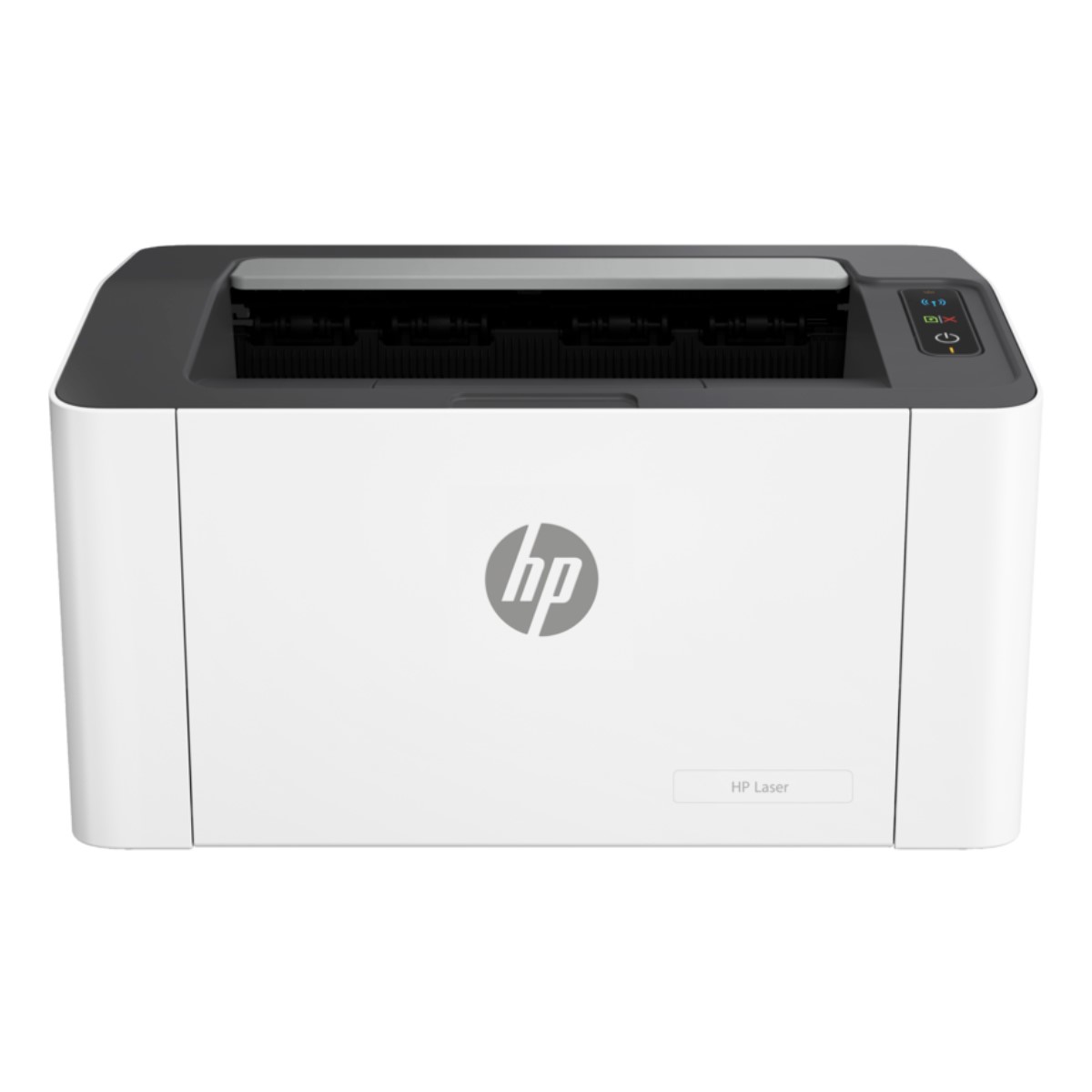
HP Laser 1008w Wifi Printer
Rs 49,000.00 Prices are Inclusive of Taxes
HP Laser 1008w Wifi Printer
- Black and white
- Print speed up to 21 ppm (black)
- For teams up to 5 users; Prints up to 1,500 pages/month
Compare
Please, enable Compare.
Wishlist
Please, enable Wishlist.
HP Laser 1008w Wifi Printer
- Black and white
- Print speed up to 21 ppm (black)
- For teams up to 5 users; Prints up to 1,500 pages/month
Legendary quality, surprisingly affordable price
This surprisingly small laser delivers exceptional quality, page after page.
Designed to fit your space
You can fit this printer almost anywhere – it’s that small and compact.
Easy mobile printing and scanning with HP app
Get simple setup, and print and scan from your phone, with the HP app.
Features of HP Laser 1008w Wifi Printer
- Weight: 5.4KG
- Brands: HP
- Model: Laser 1008w
- Categories: HP Printers
- Warranty – 1 Year
No network, no problem
Connect your smartphone or tablet directly to your printer – and easily print without accessing a network.[5][6]
Uncompromising laser quality
This surprisingly small laser delivers exceptional quality, page after page.
Fast printing
Get print speeds up to 21 ppm.[2]
Sharp, black text
Produce sharp text, bold blacks, and crisp graphics.
The right price
Rely on a high-performance laser printer at an affordable price.
Small, compact size
You can fit this printer almost anywhere – it’s that small and compact.
The power of your printer in the palm of your hand
Get simple setup, and print and scan from your phone, with the HP app.[1][6]
Your device, your choice
Easily print from a variety of smartphones and tablets.[3][6]
Extend your printing reach
Easily share resources – access and print with wireless networking.[4][6]
HP Laser 100, 1000 Printers – First time printer setup
To set up a printer for the first time, remove the printer and all packing materials from the box, load paper into the input tray, connect the power cable, and then download and install the printer software.
Remove the printer from the box
Remove the printer from the box, and then remove all tape, stickers, and packing materials.
Remove the printer from the box.

Remove all tape and packing materials from the outside of the printer.
Install the toner cartridge
Remove the toner cartridge from the printer, remove the sealing tape, and then reinstall the toner cartridge.
Lift the top cover.
Remove the packing material from the toner cartridge access area, and then remove the toner cartridge.
Callout
Description
1
Packing material
2
Toner cartridge
Remove the sealing tape.
Grasp both sides of the toner cartridge, and then distribute the toner by gently rocking the toner cartridge back and forth.
Align the toner cartridge with the tracks inside the printer, and then push the toner cartridge until it is firmly seated.
Lower the top cover.
Load paper
Load a stack of plain white paper into the input tray.
Open the input tray.
Slide out the paper guides.
Load a stack of U.S. letter or A4 size paper into the input tray with the short edge forward and the print side up. Push the stack into the tray until it stops.
Slide in the paper guides until they rest against the edges of the paper. Do not push the paper guides so far in that they bind the paper.
Open the output tray and extension.
Callout
Description
1
Output tray
2
Output tray extension
Turn the printer on
Connect your printer to an electrical outlet and turn the printer on.
Press the Power button.
Install the printer software
Your HP printer hardware is now set up, and you can install the printing software.
Download the latest version of the printing software
https://support.hp.com/sk-en/drivers/hp-laser-1000-printer-series/model/2101513672
https://forttune.lk/forttune-channels-pvt-ltd-about-us/
Related products
 HP Laser 1008w Wifi Printer
 Rs 49,000.00 Prices are Inclusive of Taxes